
Drones have completely changed how we look at land, construction sites, farms, and disaster zones. What used to take weeks of fieldwork now takes a few hours in the air. But here is the truth: A drone alone is just a flying camera. The real magic happens in the software that turns raw aerial photos into accurate maps, 3D models, and GIS-ready data. That is exactly where the Best Drone Mapping Software plays a critical role in transforming aerial data into precise, actionable insights.
If you have been searching for the best drone mapping software, you already know there are dozens of options out there. Some are built for beginners. Some are made for professional surveyors. And some are packed with features that even engineers get excited about. Choosing the wrong one wastes time, money, and the entire point of flying the drone in the first place.
This guide cuts through the noise. It covers the top drone mapping platforms in 2026, what they do, who they are built for, how much they cost, and what makes each one stand out. Whether you are mapping a construction site, monitoring crops, planning a city, or conducting emergency response operations, this article will help you find the right tool for your exact needs.
What Is Drone Mapping Software and Why Does It Matter?
Drone mapping software takes hundreds or thousands of aerial images captured during a drone flight and stitches them together into useful outputs. These outputs include:
- 2D orthomosaic maps: High-resolution flat maps with accurate real-world coordinates
- 3D point clouds: Millions of data points that define the shape of a surface
- Digital Elevation Models (DEMs): Maps that show the height and terrain of land
- 3D mesh models: Visual models that can be rotated and inspected from any angle
- GIS layers: Data formats like shapefiles and KML files that work in mapping platforms
Without this software, drone data is just a pile of photos. With the right software, those same photos become precise measurement tools used in construction, agriculture, mining, urban planning, and environmental monitoring.
How We Evaluated the Best Drone Mapping Software
Every software on this list was evaluated based on:
- Processing accuracy: How precise the final maps and models are
- Ease of use: Whether a beginner or a professional can work with it comfortably
- Output formats: What file types the software exports and how well they integrate with GIS tools
- Flight planning features: Whether the app helps automate drone missions
- Cloud vs. desktop processing: Speed, storage, and accessibility
- Pricing and value: What you get at each price tier
- Integration with popular GIS platforms: ArcGIS, QGIS, AutoCAD, and others
Top 10 Best Drone Mapping Software in 2026
1. DJI Terra
Best for: DJI drone users and beginners
DJI Terra is one of the most widely used drone mapping tools in 2026, especially among people who already fly DJI drones. It works right out of the box with most DJI models, which removes a big compatibility headache. The interface is clean, the mission planning is straightforward, and the 3D reconstruction quality is solid for general-purpose use.
Key Features:
- Automated flight mission planning with safety checks
- Real-time 2D and 3D map generation during flight
- Point cloud generation and 3D mesh output
- Works offline, which is critical in remote field areas
- Compatible with DJI Phantom, Matrice, and Mavic series
Pros:
- Deep integration with DJI hardware
- Very user-friendly for beginners
- Real-time processing during flight saves post-processing time
Cons:
- Limited to DJI drones does not support third-party hardware well
- Advanced GIS export features are locked behind the higher-tier license
- Fewer analytical tools compared to industry-grade alternatives
Pricing: Free basic version; Professional license starts at around $1,300/year
2. Pix4D
Best for: Professional surveyors, engineers, and GIS specialists
Pix4D has been a benchmark in professional photogrammetry for years, and in 2026 it remains one of the most trusted names in the field. The platform is actually a family of products: Pix4Dmapper for general mapping, Pix4Dfields for agriculture, Pix4Dsurvey for land surveying, and Pix4Dreact for fast emergency response mapping.
Key Features:
- Industry-leading photogrammetric accuracy
- Full support for GCPs (Ground Control Points) for survey-grade precision
- Exports to AutoCAD, ArcGIS, QGIS, and other professional platforms
- Multispectral and thermal image processing for agriculture and inspection
- Cloud processing with collaboration tools for teams
Pros:
- Extremely accurate, trusted for legal survey deliverables
- Modular product suite for different industries
- Strong documentation and support community
Cons:
- Steep learning curve for new users
- Pricing is on the higher end
- Some modules feel like separate products rather than one unified platform
Pricing: Starts at approximately $350/month; annual plans available with discounts
3. Agisoft Metashape

Best for: Researchers, archaeologists, and high-accuracy 3D modeling
Agisoft Metashape (formerly PhotoScan) is a desktop powerhouse. It has been the go-to tool in academic, archaeological, and scientific environments for well over a decade. In 2026, it still delivers some of the most detailed 3D models available and at a price point that does not require an enterprise budget.
Key Features:
- Photogrammetric processing with high geometric accuracy
- Supports dense point cloud generation, mesh, texture, and DEM output
- Batch processing for large image sets
- Python scripting support for automation
- Works well for close-range photogrammetry (not just drones)
Pros:
- One-time licensing fee, no subscription required
- Excellent for detailed heritage and archaeological documentation
- Highly customizable through scripting
Cons:
- Older-looking interface not as polished as newer tools
- No built-in flight planning module
- Requires a powerful workstation for large projects
Pricing: Standard license at $179 (one-time); Professional license at $3,499 (one-time)
4. DroneDeploy
Best for: Construction, agriculture, and enterprise teams
DroneDeploy is a cloud-first platform that has grown into a full enterprise mapping solution. It is especially popular in the construction industry for its integration with project management tools and its ability to track site progress over time with repeated drone flights.
Key Features:
- Automated flight planning with one-tap map generation
- AI-powered analysis for stockpile volume, plant health, and defect detection
- Live map feature see the map built in real-time during flight
- Integration with Procore, Autodesk, and BIM platforms
- Access via mobile app, browser, or desktop
Pros:
- Very fast from flight to finished map
- Excellent collaboration features for teams
- Strong integrations with construction software
Cons:
- Annual subscription can be expensive for small operators
- Full AI analysis features require higher-tier plans
- Some users report limited customer support response times
Pricing: Plans start at around $329/month; enterprise pricing on request
5. Maps Made Easy
Best for: Budget-conscious users and hobbyists
Maps Made Easy is one of the most affordable cloud-based drone mapping platforms available. It works on a pay-per-use or subscription model, which makes it ideal for occasional users who do not need a full annual subscription. Despite its lower price, it delivers solid orthomosaic maps and 3D models for standard use cases.
Key Features:
- Upload images from any drone, not brand-locked
- Cloud-based processing, no powerful computer needed
- Produces orthomosaic maps, DSMs, and 3D models
- Simple interface with minimal setup required
Pros:
- Very affordable, pay only for what you use
- Works with any drone brand
- Great for small businesses and individual operators
Cons:
- Fewer advanced features than enterprise tools
- Processing times can be slower than dedicated desktop software
- Limited GIS export options compared to premium platforms
Pricing: Free tier with limited uploads; paid plans from around $25/month
6. senseFly (now Parrot Anafi AI + eMotion)
Best for: Fixed-wing drone operations and precision agriculture
senseFly’s eMotion software, now closely tied to Parrot’s ecosystem, is built for fixed-wing drones covering large areas. It is widely used in precision agriculture and land surveying across wide open terrains where rotary drones would struggle with flight time and coverage.
Key Features:
- Optimized for large-area coverage missions
- Integrates with Parrot Anafi AI and senseFly eBee series
- Supports multispectral data processing for crop analysis
- Advanced flight planning with obstacle avoidance
Pros:
- Purpose-built for large-scale agricultural and survey projects
- Reliable in field conditions with offline capability
- Strong multispectral processing for NDVI maps
Cons:
- Best suited for specific drone hardware
- Steeper learning curve for new users
- Less general-purpose than other tools on this list
Pricing: Bundled with senseFly and Parrot hardware; standalone licensing available on request
7. OpenDroneMap (ODM)
Best for: Open-source users, developers, and budget researchers
OpenDroneMap is a free, open-source photogrammetry toolkit that has become the favorite of the developer community and nonprofits with limited budgets. It can process drone imagery into orthomosaics, point clouds, DEMs, and 3D models using completely free software. WebODM, its browser-based front end, makes it accessible even to non-technical users.
Key Features:
- 100% free and open-source
- Can be run locally or on a server for team use
- Produces orthomosaics, point clouds, DSMs, and 3D textured meshes
- Active developer community with regular updates
- Works with imagery from any drone
Pros:
- Zero cost for the software itself
- Full control over data, no third-party cloud required
- Actively maintained and improving
Cons:
- Setup requires more technical knowledge than commercial tools
- Support is community-based, not professional
- Processing can be slower without high-end hardware or server setup
Pricing: Free (open-source); WebODM Lightning cloud processing plans start at around $20/month
8. Esri Drone2Map
Best for: Organizations already using ArcGIS
Esri Drone2Map is built specifically for organizations that live inside the ArcGIS ecosystem. It takes drone imagery and converts it into GIS-ready products that feed directly into ArcGIS Online, ArcGIS Pro, and Enterprise systems. For government agencies, utilities, and environmental organizations already using Esri software, this is the most seamless workflow available.
Key Features:
- Direct integration with ArcGIS Online and ArcGIS Pro
- Produces 2D/3D products ready for GIS analysis
- Template-based processing for repeatability
- Supports orthomosaics, point clouds, DSMs, and 3D meshes
Pros:
- Perfect fit for ArcGIS-heavy workflows
- No data migration needed, outputs go straight to ArcGIS
- Reliable accuracy with GCP support
Cons:
- Only makes sense if you already use ArcGIS
- More expensive than general mapping tools
- Not ideal for standalone mapping without the broader Esri ecosystem
Pricing: Around $1,500/year; ArcGIS license required separately
9. Propeller Aero
Best for: Construction and civil earthworks tracking
Propeller Aero focuses heavily on construction site monitoring, earthworks measurement, and volumetric calculations. It combines drone data with its own AeroPoints (smart ground control points) for high accuracy, and its platform is designed specifically for site managers and project engineers.
Key Features:
- AeroPoints for highly accurate GCP placement
- Automated stockpile and earthworks volume calculations
- Survey-grade accuracy without needing a licensed surveyor
- Team dashboards with site progress tracking over time
Pros:
- Excellent accuracy with AeroPoints system
- Intuitive dashboards built for construction teams
- Strong customer support and onboarding
Cons:
- AeroPoints are an additional hardware cost
- Best suited for construction, limited for agriculture or inspection use cases
- Pricing can add up quickly for smaller operations
Pricing: Starts around $299/month; AeroPoints cost extra
10. Correlator3D (SimActive)
Best for: Defense, government, and large-scale aerial mapping
SimActive’s Correlator3D is a professional-grade photogrammetry software used by national mapping agencies, defense contractors, and large engineering firms. It is designed for processing high volumes of imagery from both drones and manned aircraft, making it one of the most scalable tools on this list.
Key Features:
- GPU-accelerated processing for extremely fast large-area mapping
- Supports nadir, oblique, and LiDAR data fusion
- Produces DSMs, DTMs, orthomosaics, and 3D models
- Used by national mapping agencies and government bodies
Pros:
- Handles massive datasets with ease
- Very high accuracy for government-grade deliverables
- Versatile works with drone and traditional aerial data
Cons:
- Not suited for everyday commercial users
- High cost and enterprise-level complexity
- Requires significant processing hardware investment
Pricing: Enterprise licensing pricing on request
Comparison Table: Best Drone Mapping Software at a Glance
| Software | Best For | Processing Type | Starting Price | GIS Integration | Ease of Use |
| DJI Terra | DJI drone users | Cloud + Desktop | Free / ~$1,300/yr | Moderate | Easy |
| Pix4D | Professionals & surveyors | Cloud + Desktop | ~$350/month | Excellent | Moderate |
| Agisoft Metashape | Research & 3D modeling | Desktop | $179 one-time | Good | Moderate |
| DroneDeploy | Construction & enterprise | Cloud | ~$329/month | Excellent | Easy |
| Maps Made Easy | Budget users | Cloud | ~$25/month | Basic | Very Easy |
| OpenDroneMap | Developers & nonprofits | Local/Cloud | Free | Good | Technical |
| Esri Drone2Map | ArcGIS users | Desktop | ~$1,500/yr | Best (ArcGIS) | Moderate |
| Propeller Aero | Earthworks & construction | Cloud | ~$299/month | Good | Easy |
| senseFly eMotion | Fixed-wing / Agriculture | Desktop | Hardware bundle | Good | Moderate |
| Correlator3D | Government & defense | Desktop | Enterprise | Excellent | Advanced |
Key Features to Look for in Drone Mapping Software
1. Processing Accuracy and Photogrammetry Engine
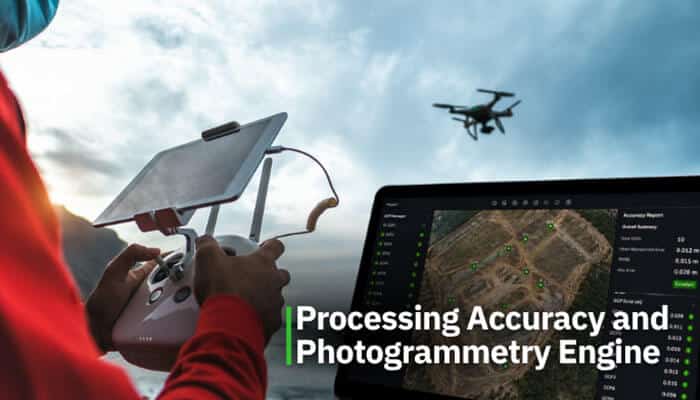
The most important thing any drone mapping software must do is produce accurate results. Look for software that supports:
- Ground Control Points (GCPs) for survey-grade accuracy
- Real-Time Kinematic (RTK) and Post-Processed Kinematic (PPK) GPS data integration
- Accuracy reports that show GCP error margins and quality indicators
2. Output File Formats
Good drone mapping software should export files your team can actually use:
- Orthomosaic (GeoTIFF): For use in GIS platforms
- Point cloud (LAS/LAZ): For engineering and BIM software
- DEM/DSM: For terrain analysis
- OBJ, FBX, PLY: For 3D visualization and CAD tools
- Shapefiles and KML/KMZ: For GIS layering
3. GIS Integration
The best drone mapping software in 2026 must play well with GIS platforms. Look for:
- Native export to ArcGIS, QGIS, AutoCAD, or Revit
- API access for automated data pipelines
- Web map tile (WMTS/WMS) support for browser-based GIS
4. Flight Planning Tools
Some software includes built-in flight planning apps. These are helpful because they let you:
- Plan automated grid or crosshatch flight patterns
- Set overlap percentages (typically 70–80% front, 60–70% side)
- Adjust for terrain following on hilly land
- Preview estimated coverage before flying
5. Cloud vs. Desktop Processing
| Cloud Processing | Desktop Processing | |
| Speed | Depends on internet | Depends on hardware |
| Cost | Subscription-based | One-time or hardware |
| Accessibility | Anywhere | Only on your machine |
| Data privacy | Stored on servers | Stays on your computer |
| Best for | Teams, field workers | High-security, large files |
Use Cases: Matching Software to Your Industry
Construction and Civil Engineering
Best picks: DroneDeploy, Propeller Aero, Pix4D
Construction teams need volume calculations, progress tracking, and BIM integration. These tools give site managers the data to catch costly mistakes early and keep projects on schedule.
Precision Agriculture
Best picks: Pix4Dfields, senseFly eMotion, DroneDeploy
Farmers and agronomists use drones to generate NDVI maps, track crop health, identify irrigation problems, and calculate field statistics. Multispectral camera support is critical here.
Land Surveying and Cadastral Mapping
Best picks: Pix4Dsurvey, Esri Drone2Map, Correlator3D
Licensed surveyors need sub-centimeter accuracy, GCP support, and legally defensible output formats. These tools are built to meet that bar.
Environmental Monitoring
Best picks: Agisoft Metashape, OpenDroneMap, DroneDeploy
Tracking coastline erosion, forest canopy change, wetland mapping, and habitat surveys requires repeatable, accurate mapping. Open-source and affordable tools work well here.
Emergency Response and Disaster Management
Best picks: Pix4Dreact, DroneDeploy, DJI Terra
Speed is everything in disaster scenarios. These tools prioritize fast processing so response teams get usable maps within minutes of a flight.
Urban Planning and Smart Cities
Best picks: Esri Drone2Map, Pix4D, DroneDeploy
City planners need data that integrates with municipal GIS systems. ArcGIS-compatible tools and high-density 3D models are essential for this use case.
Understanding Drone Mapping Accuracy
One of the most common questions people ask about drone mapping software is how accurate is it, really?
Here is a simple breakdown:
Without GCPs (using GPS alone):
- Horizontal accuracy: 1–5 meters
- Vertical accuracy: 2–10 meters
- Good enough for: Basic area measurements, general maps, visual inspection
With GCPs (survey-grade):
- Horizontal accuracy: 1–3 centimeters
- Vertical accuracy: 2–5 centimeters
- Good enough for: Legal surveys, engineering, construction staking, cadastral mapping
With RTK/PPK-enabled drones:
- Horizontal accuracy: 1–5 centimeters (without physical GCPs)
- Vertical accuracy: 3–10 centimeters
- Good enough for: Rapid surveys, volume calculations, terrain modeling
The best drone mapping software will always tell you what accuracy level you are achieving and give you a quality report at the end of processing.
Drone Mapping Software for Beginners: Where to Start
If you are brand new to drone mapping, here is a simple path to follow:
1. Start with DJI Terra (free version) if you own a DJI drone, it is beginner-friendly and gets you producing maps quickly
2. Try Maps Made Easy if you want cloud-based processing without worrying about computer specs
3. Explore OpenDroneMap/WebODM if you want free open-source processing and do not mind a small learning curve
4. Move to DroneDeploy or Pix4D once you are doing this professionally and need advanced features and team collaboration
Common Mistakes People Make When Choosing Drone Mapping Software
- Choosing based on price alone: Cheap tools often lack the accuracy or export formats professional work requires
- Ignoring GCP support: If you need survey-grade accuracy, the software must support GCPs
- Not checking drone compatibility: Some software only works with specific drone brands
- Skipping the free trial: Most professional tools offer trial periods; always test before buying
- Forgetting about data security: Cloud tools store your data on servers; check where and how before uploading sensitive site data
Final Thoughts: Choosing the Best Drone Mapping Software for Your Needs
There is no single answer to which is the best drone mapping software because the best tool depends entirely on what you are mapping, how accurate you need to be, what your budget looks like, and what software your team already uses.
Here is a quick summary to help you decide:
- Best overall for professionals: Pix4D
- Best for DJI users: DJI Terra
- Best for construction: DroneDeploy or Propeller Aero
- Best for GIS teams using ArcGIS: Esri Drone2Map
- Best for a tight budget: Maps Made Easy or OpenDroneMap
- Best for research and 3D modeling: Agisoft Metashape
- Best for large-scale government projects: Correlator3D
Whatever you choose, invest time in learning the software properly. A powerful tool used poorly will always lose to a simpler tool used well. Take the free trials, watch the tutorials, and test your results against known measurements before relying on any software for critical deliverables.
Drone mapping technology in 2026 is more accessible, more accurate, and more integrated than ever before. The right software is out there, and now you have everything you need to find it.
Best Drone Mapping Software FAQs
1. What is the most accurate drone mapping software in 2026?
For survey-grade accuracy, Pix4D, Correlator3D, and Propeller Aero (with AeroPoints) consistently deliver the best results when used with proper GCPs or RTK/PPK-enabled drones.
2. Can I use drone mapping software on a regular laptop?
Yes, many cloud-based tools like DroneDeploy, Maps Made Easy, and WebODM run entirely in a browser. Desktop tools like Agisoft Metashape and Pix4D perform better on a machine with a dedicated GPU and at least 16–32 GB of RAM for large projects.
3. What is the best free drone mapping software?
OpenDroneMap is the best free option, with full photogrammetric processing at zero software cost. DJI Terra also has a free tier for basic mapping, and Maps Made Easy offers a limited free plan.
4. Do I need special hardware to use drone mapping software?
You need a drone with a camera capable of capturing images with GPS/EXIF data, and for precision work, GCPs or an RTK-capable drone. On the computer side, more RAM and a dedicated GPU will speed up processing significantly.
5. Is drone mapping legal everywhere?
Regulations vary by country and region. Always check with your local aviation authority (such as the FAA in the US, DGCA in India, or CAA in the UK) before flying for mapping purposes, especially in commercial contexts.
6. How long does it take to process drone mapping data?
A small site (under 200 images) can process in 10–30 minutes on a modern desktop or cloud system. Large sites with thousands of images may take several hours. Cloud platforms often parallelize processing to reduce wait time.